A few years back, I was working at a company that is a global leader in retail. We had just successfully installed a Strimzi-based Kafka and Kafka Connect cluster on Kubernetes. The platform was up, stable, and ready. The next obvious step was integrations - one by one.
One of the first integrations assigned to me was with Solace.
At that time, Solace was not yet a central messaging platform. It was still in its early adoption phase, with a handful of teams publishing messages as part of ongoing experiments. Our goal was to bring selected streams from Solace into Kafka using a Solace Source Connector running on Kafka Connect.
The Easy Part: PoC Success
I started by studying Solace fundamentals - topics, queues, subscriptions, and consumption models. Solace’s documentation and courses was decent, and it didn’t take long to get productive.
I set up a local PoC using dockerized Solace broker, Kafka, Kafka Connect and a Solace Source Connector.
Within a short time, I had messages flowing from a Solace subscription into Kafka topics.
I demoed the PoC to my team and manager. Everyone was happy. We communicated the success to other teams, and the Solace–Kafka integration was officially considered "done."
Or so we thought.
Reality Arrives: Production
A few months later, the real requirements showed up.
The Solace team wanted to run proper integration tests against their production-like Solace environment. Their setup was still evolving, and my responsibility was to ensure that Kafka Connect could reliably consume from Solace.
We intentionally limited scope - one pipeline, one connector - pilot only.
I integrated the Solace Source Connector into our Kafka Connect Docker image, wired it into the CI/CD pipeline, and deployed it to Kubernetes.
Everything looked good. I configured the connector and started it.
And… it failed - right away.
The Error That Changed Everything
After digging through the logs, one error stood out clearly:
INFO Channel Closed (smfclient 6) (com.solacesystems.jcsmp.protocol.impl.TcpClientChannel) [task-thread-solaceSourceConnector-0]
INFO closeOutbound() : isSslDowngradeEnabled: false, mSslEngineClosed: false (com.solacesystems.jcsmp.protocol.smf.SSLSmfClient) [task-thread-solaceSourceConnector-0]
INFO Received Solace exception java.security.cert.CertificateException: java.security.cert.CertPathValidatorException: Path does not chain with any of the trust anchors, with the following: [com.solacesystems.jcsmp.protocol.impl.TcpChannel.executePostOnce(TcpChannel.java:257), com.solacesystems.jcsmp.protocol.impl.ChannelOpStrategyClient.performOpen(ChannelOpStrategyClient.java:90), com.solacesystems.jcsmp.protocol.impl.TcpClientChannel.performOpenSingle(TcpClientChannel.java:416), com.solacesystems.jcsmp.protocol.impl.TcpClientChannel.access$800(TcpClientChannel.java:106), com.solacesystems.jcsmp.protocol.impl.TcpClientChannel$ClientChannelConnect.call(TcpClientChannel.java:2390), com.solacesystems.jcsmp.protocol.impl.TcpClientChannel.open(TcpClientChannel.java:392), com.solacesystems.jcsmp.impl.JCSMPBasicSession.sniffRouter(JCSMPBasicSession.java:354), com.solacesystems.jcsmp.impl.JCSMPBasicSession.connect(JCSMPBasicSession.java:1191), com.solace.connector.kafka.connect.source.SolSessionHandler.connectSession(SolSessionHandler.java:176), com.solace.connector.kafka.connect.source.SolaceSourceTask.start(SolaceSourceTask.java:81), org.apache.kafka.connect.runtime.WorkerSourceTask.execute(WorkerSourceTask.java:208), org.apache.kafka.connect.runtime.WorkerTask.doRun(WorkerTask.java:177), org.apache.kafka.connect.runtime.WorkerTask.run(WorkerTask.java:227), java.util.concurrent.Executors$RunnableAdapter.call(Executors.java:511), java.util.concurrent.FutureTask.run(FutureTask.java:266), java.util.concurrent.ThreadPoolExecutor.runWorker(ThreadPoolExecutor.java:1149), java.util.concurrent.ThreadPoolExecutor$Worker.run(ThreadPoolExecutor.java:624), java.lang.Thread.run(Thread.java:748)]  (com.solace.connector.kafka.connect.source.SolaceSourceTask) [task-thread-solaceSourceConnector-0]
INFO ================ Failed to create JCSMPSession Session (com.solace.connector.kafka.connect.source.SolaceSourceTask) [task-thread-solaceSourceConnector-0]
INFO ================ Shutting down PubSub+ Source Connector (com.solace.connector.kafka.connect.source.SolaceSourceTask) [task-thread-solaceSourceConnector-0]
java.security.cert.CertPathValidatorException: Path does not chain with any of the trust anchors
This was not a Kafka error. Not a Solace error. Not a misconfiguration typo. This was TLS.
At that point in my career, my understanding of certificates was… shallow. Same for most of my team members. I reached out to the Solace team - they were equally unsure.
So I did what engineers eventually used to do: I stopped guessing and started learning.
Who Is the Client and Who Is the Server?
Before going deeper, it’s important to be very precise about roles:
- Solace broker -> TLS server
- Kafka Connect + Solace Source Connector -> TLS client
The Solace source connector running in the Kafka Connect was trying to establish a secure TCP (TCPS) connection to the Solace broker. That connection failed during certificate validation.
So the problem had nothing to do with Kafka or Connect itself. It was about trust.
How Secure Client–Server Communication Actually Works
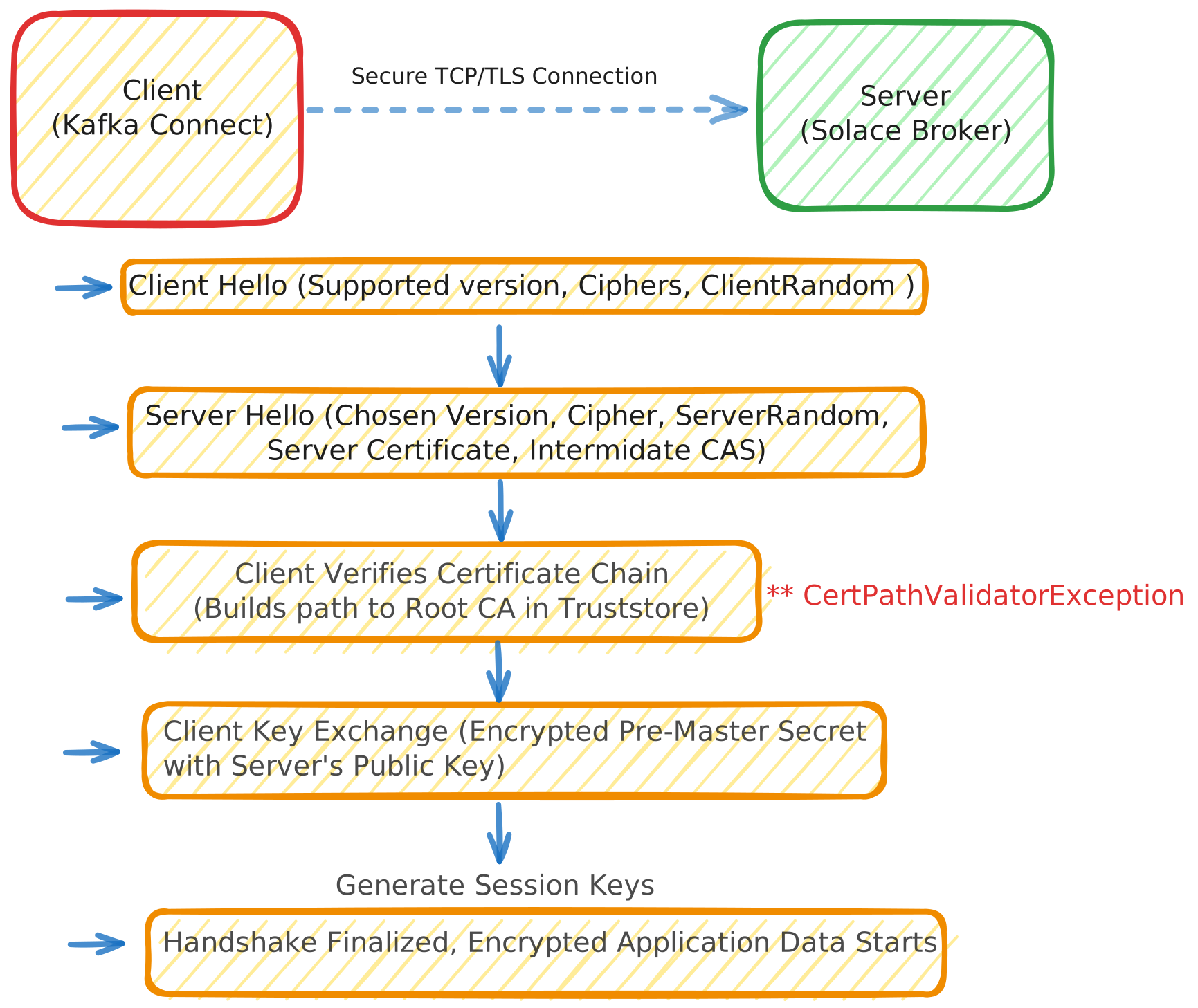
TLS is often explained as the server encrypting data with a key, but that’s an oversimplification. It is actually a multi-stage negotiation.
1. The Trust Phase (Asymmetric Encryption)
When the Kafka Connect client hits the Solace broker, the broker presents its certificate.
The client (Kafka Connect) checks if the certificate is valid, not expired, and matches the hostname - basically an identity check.
Then client looks at the signature on the certificate. If it doesn't recognize the signer, it looks for the signer's certificate, and so on, until it finds a Root CA it trusts in its truststore.
Once trust is established, the client uses the server’s public key to encrypt a random pre-master secret and sends it back. Only the server can decrypt this because only the server has the matching Private Key. This is the key exchange phase.
2. The Data Phase (Symmetric Encryption)
Asymmetric encryption (using public/private keys) is computationally expensive and slow. Once both sides have safely shared the secret mentioned above, they generate Symmetric Keys - one single key to encrypt and decrypt data.
From this point forward, both the client and server use the same key to encrypt and decrypt the actual message payload.
This provides high-speed confidentiality and ensures that even if someone intercepts the traffic, it looks like gibberish.
The Role of Certificates
A TLS certificate is primarily an identity document.
It contains:
- The server’s public key
- The server’s identity (DNS names)
- A digital signature from a Certificate Authority (CA)
The private key corresponding to that public key stays on the server and is never shared.
Certificate Authorities and Trust
Here is the critical question:
Why should a client trust a certificate presented by a server?
Because it is signed by a Certificate Authority (CA) that the client already trusts.
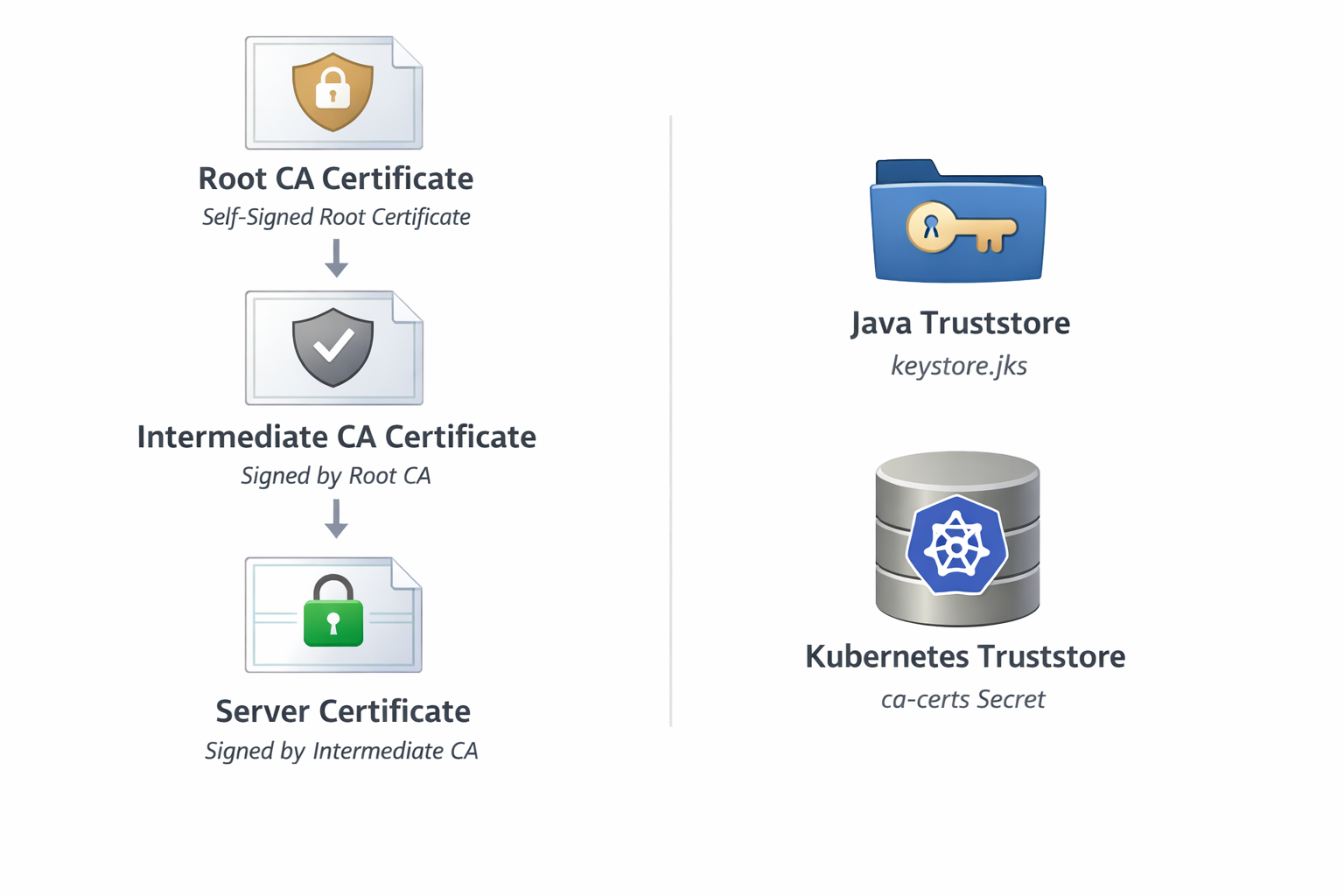
Operating systems and JVMs ship with a predefined set of trusted root CA certificates. These live in a file called a truststore.
It is worth noting the difference between the two stores often used in Java: while a Truststore is used to store certificates from identities we trust (like the Solace broker), a Keystore is used to store our own private keys and certificates to prove our identity to others.
Public web trust is dominated by a relatively small number of root CAs (DigiCert, Sectigo, GlobalSign, etc.). Enterprises often add their own internal root CAs on top of that.
Certificate Chains (This Is Where Things Break)
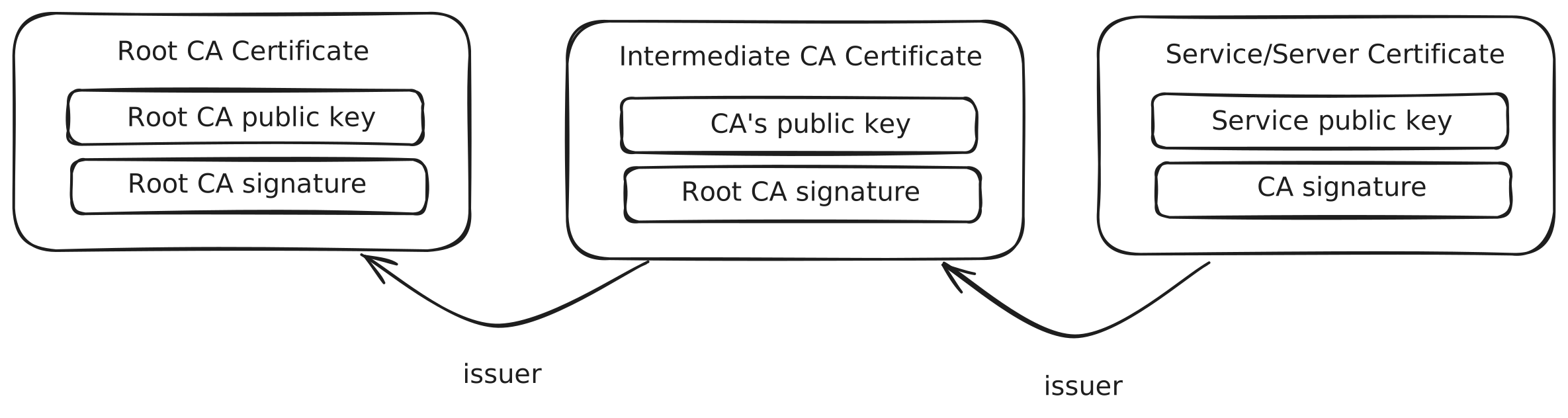
In practice, certificates form a chain that contains:
- Root CA certificate (self-signed, trusted implicitly)
- Intermediate CA certificate(s) (signed by the root)
- Server certificate (signed by an intermediate)
When a TLS handshake starts, the server sends its certificate (and usually intermediates) to the client. The client tries to build a chain. The chain must end at a root certificate present in the client’s truststore.
The client acts like a detective tracing a lineage. It starts with the server's certificate and follows the signatures upward. Each certificate must prove the identity of the one below it, eventually leading to a Root CA that the client explicitly trusts in its truststore. If any link is missing-or if the detective doesn't recognize the person at the top of the family tree - the investigation (and the connection) fails immediately.
What CertPathValidatorException Really Means
In Java terms, this error means exactly one thing:
"I cannot build a valid certification path from the server certificate to any trusted root certificate."
Common reasons could be at least one of the following or more:
- The root CA is missing from the truststore (one of our case)
- An intermediate CA is missing (one of our case)
- The certificate is expired
- The certificate is signed by an unknown internal CA
- The server sends an incomplete certificate chain
In Java terms, this error occurs strictly during phase 1 - trust phase. It means the Kafka Connect client reached the end of the chain provided by the Solace server and never found a Trust Anchor (a Root CA) that existed in its local cacerts file. Because it couldn't verify who the server was, it refused to move to phase two towards data exchange.
Why It Worked Locally but Failed in Production
This part was painful but educational. When I looked back at my local PoC, I realized I hadn't actually tested the security layer at all.
My local Dockerized Solace broker was configured for plain text communication. I was connecting via a standard TCP port without TLS enabled. Because there was no handshake, there were no certificates to validate. It just worked because the security door was wide open.
The production-like Solace environment was hardened. It required a secure TCPS connection. Kafka Connect was now running inside a minimal Linux container. Unlike a corporate laptop, these containers don't come pre-loaded with any internal company certificates. The JVM truststore inside that container was empty of any Enterprise trust.
The code and the connector logic were identical in both environments. The difference was the infrastructure requirements: the local environment didn't ask for an identity, but the production environment demanded a passport (the certificate) that my container didn't know how to verify.
The Fix (Conceptually Simple, Operationally Non-Trivial)
Once the root cause was clear, the solution itself was straightforward, but it required changes on both ends of the connection.
On the Solace side:
- The broker certificate was updated to present a complete certificate chain, including the correct intermediate CA.
On the Kafka Connect side:
- Obtain the enterprise root (and intermediate) CA certificates used by Solace
- Convert them into a format usable by Java
- Add them to Kafka Connect’s truststore
- Mount that truststore securely into the Kafka Connect container
- Reference it in the connector configuration
# Most corporate certificates are issued in binary (DER) format. We convert
# them to PEM (Base64) to make them compatible with Linux tools and easier to bundle.
openssl x509 -inform der -in certificate.cer -out certificate.pem

# Since Kafka Connect runs on the JVM, it cannot read the PEM file directly.
# We must import it into a JKS (Java KeyStore) file.
keytool -import -file certificate.pem -alias ent-root -keystore trustStoreFile -storepass verySecretPassword

# Finally, we store that truststore file as a Secret so Strimzi can mount it
# into our Kafka Connect pods.
kubectl create secret generic team-trust-store --from-file=trustStoreFile
In Kubernetes terms:
- Create a Java truststore containing the required CA certificates
- Store it as a Kubernetes Secret
- For Strimzi-managed clusters, this involves adding the secret to the spec.
externalConfiguration.container.volumeMountssection of theKafkaConnectcustom resource. - Reference the mounted file path in the Solace Source Connector configuration (usually via
ssl.truststore.location).
Source connector config:
{
    "connector.class": "com.solace.connector.kafka.connect.source.SolaceSourceConnector",
    "errors.log.enable": "true",
    ...
    "sol.ssl_trust_store": "/opt/kafka/external-configuration/team-trust-store/trustStoreFile",
    "sol.ssl_trust_store_format": "JKS",
    "sol.ssl_trust_store_password": "verySecretPassword"
}
The Result
Once the certificate chain on the Solace broker was corrected and the Kafka Connect truststore was properly configured the TLS handshake succeeded. The full certificate chain validated cleanly. Kafka Connect established a secure session with Solace. Messages started flowing into Kafka right away.
What This Taught Me
This incident was one of my first real lessons in distributed systems:
- Security failures are often configuration, not code
- TLS errors are precise, even if they look cryptic
- Containers make trust explicit - nothing is inherited magically
- If you don’t understand certificates, production will force you to
That CertPathValidatorException marked the beginning of a much deeper journey into TLS, JVM internals, and distributed system reliability.
And honestly? I’m glad it failed. Because that failure taught me something I still use every day.